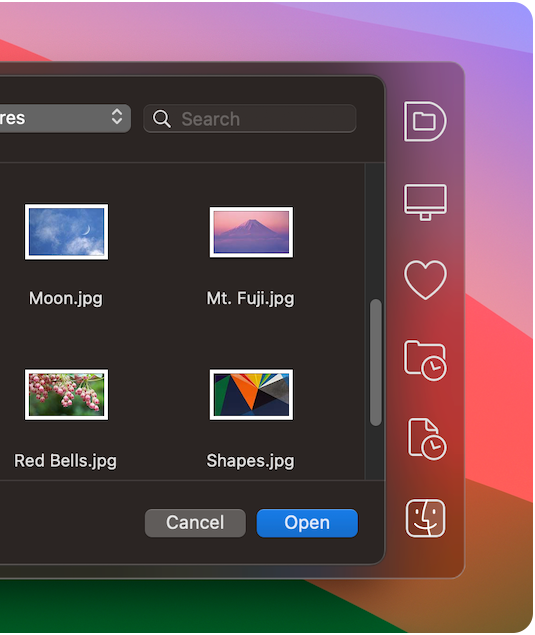
Default Folder X 6.0.6 improves support for cloud-synced folders, handles paths pasted into Quick Search, makes its Finder drawer smarter and more.
Version 6 has new time-saving features and an updated look. It supports macOS 14 Sonoma while still running on macOS 10.13 High Sierra and later.
If you're using version 5.7.8 or earlier, this may be a PAID UPGRADE.
If you have a Default Folder X license purchased on or after March 1, 2023, this upgrade is free. Your existing license number will work in version 6.
If your license was purchased between September 1, 2022 and March 1, 2023, the upgrade is $9.95. For licenses bought prior to that, upgrades are $19.95.
What's new in Default Folder X 6:
Here's a quick rundown of the major additions. Details and screenshots are on the Default Folder X 6.0 Tour page.
Use the keyboard to quickly access favorites, recent files, folders, apps or Finder windows. Pop up Default Folder X's new Quick Search window with a keyboard shortcut, type a few characters of an item's name, and then quickly go to it in a file dialog or open it in the Finder.
Wide filename field when saving files. Pretty self-explanatory - the default macOS Save As dialogs have an edit box that's way too narrow to accommodate a descriptive file name. Default Folder X 6 makes it bigger.
Drag and drop files and folders to Default Folder X's icon in the menu bar to move or copy them to another location. Pick a destination folder quickly from DFX's Recent and Favorites menus, or drill down to any folder using it's hierarchical menus.
Customize Default Folder X's menu in your menu bar. Add, remove and reorganize menus and menu items to fit your workflow.
Perform actions on files after saving them. Automatically open the saved file, attach it to an email, or run AppleScripts, Automator Workflows or Shortcuts on it.
Sync your Default Folder X settings between Macs. If you've got more than one Mac with the same file and folder organization, sync your settings via iCloud so Default Folder X works the same on both machines.
More powerful drawer in the Finder. Default Folder X's Finder drawer has been rewritten to be more useful and intuitive. Use it as a temporary drag-and-drop holding space, or as a location for often used files and folders.
Support for macOS 14 Sonoma. Yes, it's compatible with Apple's latest and greatest.
Fixed a bug that could cause slow performance when gathering information about files and folders in Dropbox, OneDrive, Google Drive or Box Drive.
In Microsoft Word Save dialogs, "Default to the current document's folder" now works with files saved in OneDrive.
What was new in the recent 6.0.5 release:
You can paste or type a complete path into the Quick Search window to open an item at that location.
Default Folder X now shows the correct name, icon and location for OneDrive, Google Drive, Dropbox and Box folders.
The history of recent Finder windows is updated when any tab of a Finder window is closed, not just when a window or its frontmost tab is closed.
Items that you've added to the Finder drawer or Drag Zone are updated instead of being removed when the items they refer to are moved or renamed.
Fixed a bug that could cause a Finder window to jump back to its previous location and size after being resized if Default Folder X's drawer was attached to it.
If you've customized the name of a Favorite, changing that Favorite to point to a different folder will not change its name.
The ToggleFinderDrawer AppleScript command returns a boolean result indicating whether the drawer is open.
Fixed a bug in Finder-click that prevented it from recognizing QSpace windows on a second display.
There's a new Info button in the Folders tab of the settings to explain what a Folder Set is.
As a long-term Mac user, i have installed demo software beyond count. Yours is one of the few that I've seen the worth in investing in.
- Daniel Kennish
It's one of those programs that I wonder how I lived without for so long. Before I was constantly clicking through directories every time I wanted to open, save or attach a file. Now I do almost everything in just a few clicks.